 Flamingo
The best photos for an AI avatar are a sharp, well-lit selfie with your whole face showing and a head-to-toe photo of you alone with both feet in the frame. Flamingo builds your twin, a free AI avatar, from exactly those two pictures, and it checks them before it starts. In the selfie it looks for one person, with eyes, nose and mouth visible. Everyday glasses are fine, sunglasses and masks aren't. In the body photo it looks for one person, from the top of the head to both feet, in ordinary clothes, and it checks that both photos show the same person. Ordinary indoor light is enough for both, and you don't need a studio or a plain wall. If a photo doesn't pass, the app marks the one to replace. Good photos matter because the twin keeps your face, skin tone, hair and proportions, so every outfit you later try on starts from them.
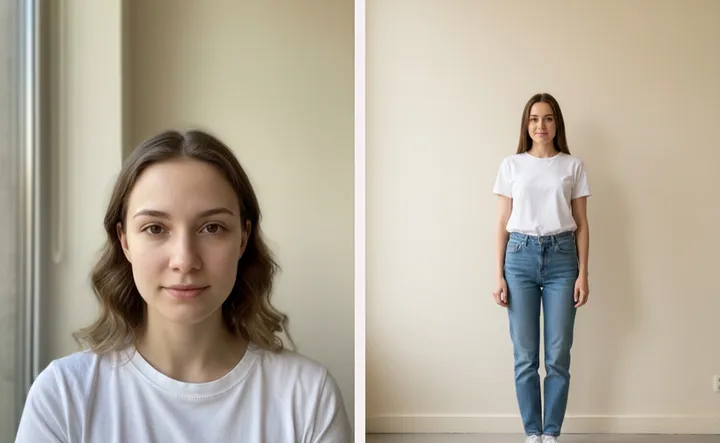
What photos do I need for an AI avatar?
Two. A selfie for your face and a full-body photo for your shape. Flamingo uses the selfie for identity and the body photo for proportions, then renders a twin of you standing in plain clothes on a clean background. Making the twin is free and takes about a minute. You don't need an account. It works on iPhone, Android and at app.tryflamingo.app.
How do I take a good selfie for the avatar?
- Face the camera straight on. Hold the phone at eye level, not from below.
- Show the whole face. Push hair away from your eyes and take off sunglasses, hats and masks. Prescription glasses can stay on.
- Use soft, even light. Stand facing a window in the day. Avoid a bright window behind you, which turns your face into a silhouette.
- Keep a neutral expression. A relaxed face gives the twin a look that suits every outfit.
- Hold still. Motion blur and camera shake fail the check. Ordinary phone sharpness passes.
How do I take a good full-body photo?
- Get your head and both feet in the frame. Ask someone to take it, use a mirror, or prop the phone up and use the timer. Leave a little space above your head and below your shoes.
- Stand straight with your arms relaxed. Face the camera with your weight on both feet.
- Wear clothes that show your shape. Fitted everyday clothes work best. A very long coat or a baggy hoodie hides your proportions, so the twin has to guess. Swimwear and sportswear are fine.
- Be the only person in the picture. Crop out anyone else before you upload.
- Shoot from about waist height. A photo taken from above shortens your legs; one from the floor stretches them.
Can I use a mirror selfie for the body photo?
Yes, as long as your head and both feet are in the mirror and the phone doesn't cover your face. Wipe the mirror and turn on the room lights first. If the phone hides your face, that's fine for the body photo, because the face comes from your selfie.
Can I use an old photo?
Yes. Any photo from your camera roll works if it passes the same checks. A recent photo is better, because the twin will look like you do now.
Why was my photo rejected?
Flamingo tells you which photo to replace. The usual reasons:
- Selfie: part of the face is covered, there's more than one person, it's blurred, or it's too dark to read your features.
- Body photo: your feet or head are cut off, someone else is in the frame, it's blurred or too dark, or you're in underwear or nothing at all.
- Both: the selfie and the body photo show two different people.
Retake the photo that failed. You don't need to redo both.
Does the avatar change my body?
No. Flamingo is told to keep your real proportions and never slim, lengthen or restyle you. That's why a clear body photo matters: the twin can only be as accurate as the picture it starts from. Read how accurate virtual try-on is for what a try-on can and can't show.
What happens to my photos?
They're used to build and update your twin. You can delete your account from the app's settings at any time. See the FAQ and the privacy policy for the details.
What can I do once the twin is ready?
Put clothes on it. Try pieces from your digital wardrobe, from the shops, or from a screenshot, and see the outfit on you before you buy it or wear it. Read the virtual try-on guide to get started.